

Quick Answer
Urban Immovable Property Tax for properties in Lahore is collected by the Excise, Taxation and Narcotics Control Department, Government of Punjab, and can be paid online through the official ePay Punjab platform at epay.punjab.gov.pk or via the ePay Punjab mobile application. To pay, you need the Property Identification Number (PIN) or Payment Slip ID (PSID) printed on your property tax challan (Form PT-10). The portal does not search by CNIC alone. The statutory deadline for annual payment is 30 September; a 1% late payment surcharge applies for each month of delay thereafter under the Punjab Urban Immovable Property Tax Act, 1958. A 5% rebate is available for self-assessment filers who pay by the deadline, subject to the annual budget.
What the Law Says
Property tax in Lahore is governed primarily by the Punjab Urban Immovable Property Tax Act, 1958 (V of 1958), as amended from time to time. The Act provides for the levy, assessment and collection of tax on buildings and land situated in rating areas declared under the Act.
The Punjab Local Government Act, 2013 (and subsequent local government legislation) empowers local governments to levy the tax within their areas, but the substantive charging, assessment and recovery provisions remain in the 1958 Act. Section 116 of the 2013 Act, for example, deals with the power of a Metropolitan Corporation or Municipal Corporation to determine the rate of property tax, while subsection (4) expressly states that urban immovable property tax shall be levied, assessed, collected and transferred under the Punjab Urban Immovable Property Tax Act, 1958.
The Excise, Taxation and Narcotics Control Department is the collecting authority for urban immovable property tax in Punjab, including Lahore. The Department’s official website links to the ePay Punjab payment gateway under “Online Payment of Excise Dues.”
Late payment is governed by Section 12 of the Punjab Urban Immovable Property Tax Act, 1958 (and corresponding provisions such as Section 89-A where applicable), which provides for a late payment surcharge at the rate of one per cent of the gross payable tax per month of delay, imposed on the first day of each month of default. The Punjab Finance Act may alter the frequency of surcharge calculation from time to time; the applicable position for the relevant financial year should always be confirmed with the Excise Department or the official ePay portal.
Who This Applies To
The online payment facility applies to owners of residential, commercial and industrial properties situated within rating areas in the Lahore district where urban immovable property tax is levied. This includes:
- Owner-occupied residential properties above the applicable exemption threshold
- Rented residential properties
- Commercial properties (shops, offices, plazas)
- Industrial properties
- Inherited properties, provided ownership records have been updated with the Excise Department
Properties falling within statutory exemptions — such as certain low-value residential properties, government-owned buildings, and properties used exclusively for public charitable or religious purposes — may not be liable to tax. Exemption thresholds are revised periodically and should be verified against the current Finance Act or Excise Department notification.
How to Pay Lahore Property Tax Online (Step-by-Step)
The following procedure reflects the current functionality of the ePay Punjab platform as described in the official ePay Punjab property tax user guide and the Excise Department’s online services page.
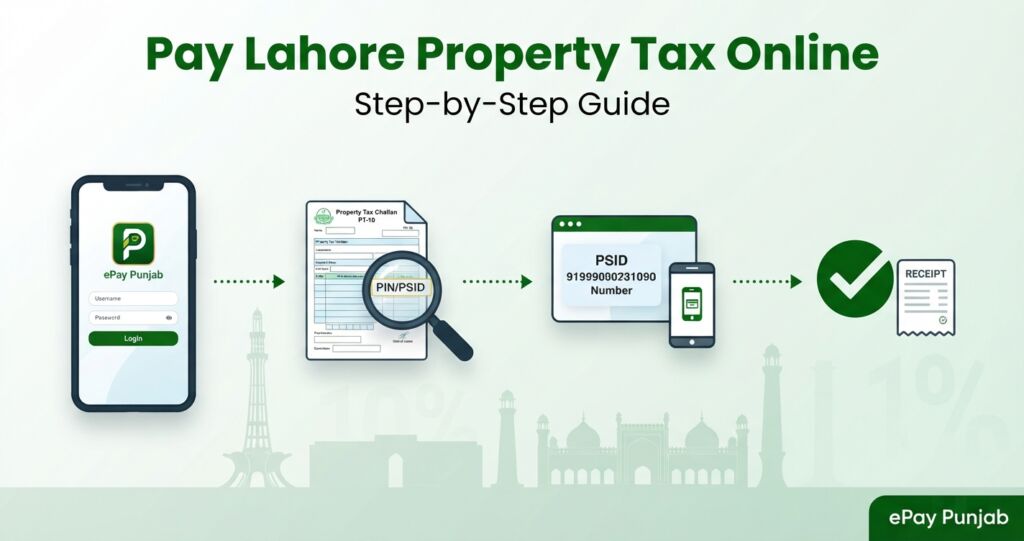
- Access the portal. Open epay.punjab.gov.pk in a browser or download the ePay Punjab app from the Google Play Store or Apple App Store. The portal is also linked from the Excise Department’s website at excise.punjab.gov.pk under “Online Payment of Excise Dues.”
- Sign in. Register or log in using your CNIC and a mobile number. Registration is a one-time process.
- Select the service. Choose “Excise and Taxation Department,” then select “Property Tax.”
- Search for your property. Enter your PIN (Property Identification Number) or PSID as printed on your property tax challan (PT-10). ePay Punjab does not retrieve property tax records by CNIC alone. If you have lost your challan and do not know your PIN, contact the Excise and Taxation office of your district.
- Select the correct PT-10. The system may display more than one PT-10 number — typically one for the current year and separate numbers for arrears. Open each entry and verify the owner name, property address and amount before proceeding.
- Generate a challan. Tap “Generate Challan” to obtain a 17-digit PSID for the transaction.
- Pay through a supported channel. Use mobile banking, internet banking, an ATM, over-the-counter bank payment, or a mobile wallet (such as JazzCash or EasyPaisa) to pay against the PSID.
- Retain the receipt. After successful payment, ePay Punjab issues an electronic receipt. Keep this for your records. The Excise Department’s records are updated upon confirmation of payment.
The ePay Punjab platform also provides a “System for Online Verification of PT10 Challan” via the Excise Department’s services page, allowing verification of challan authenticity.
What You Need Before You Start
- PIN (Property Identification Number): Printed on your property tax challan form. The ePay guide shows a pattern similar to 00000-000000000000000000000-00.
- PSID (Payment Slip ID): Also printed on the challan, or generated by the portal after selecting the property.
- A mobile number: Required to sign in to ePay Punjab.
- A payment method: A bank account with internet banking or mobile banking, an ATM card, or a mobile wallet account.
If your property tax challan has not yet been generated by the Excise Department for the current year, the portal will display a message indicating that the challan is “yet to be generated.” In that case, wait for the challan to be issued or contact your district Excise office.
Deadlines, Rebates and Surcharges
Statutory deadline. Under the Punjab Urban Immovable Property Tax Act, 1958, tax for a financial year is payable by the date fixed by the Board of Revenue, which has traditionally been 30 September of the relevant financial year. The Punjab Finance Act may prescribe a different date in a given year.
5% self-assessment rebate. For the financial year 2026–27, the Government of Punjab announced a 5% concession on property tax for owners who opt for self-assessment and pay by the deadline. Some announcements indicated a higher discount (up to 10%) for earlier payment within the same scheme. The rebate is a budget measure and is subject to change each financial year.
Late payment surcharge. Section 12 of the Punjab Urban Immovable Property Tax Act, 1958 provides for a surcharge at 1% of the gross payable tax per month of delay, imposed on the first day of each month of default. The Punjab Finance Act 2026 introduced a shift to quarterly surcharge calculation for certain taxes, with surcharge deadlines falling on 31 October, 31 January, 30 April and 31 July. The precise application to property tax should be confirmed against the current Finance Act and Excise Department notifications.
Enforcement. The Excise and Taxation Department has periodically launched recovery drives against property tax defaulters, including sealing of commercial properties. Property owners with outstanding dues should clear them promptly to avoid enforcement action.
Common Mistakes to Avoid
- Searching by CNIC alone. ePay Punjab retrieves property tax records by PIN or PSID, not by CNIC. You must have your challan or know your PIN.
- Ignoring multiple PT-10 numbers. The portal may show separate PT-10 entries for current-year tax and arrears. Failing to select the correct one can result in partial payment.
- Paying through unofficial links. Only pay through epay.punjab.gov.pk or the official ePay Punjab app. Do not pay through links received by SMS or WhatsApp.
- Assuming payment resolves an assessment dispute. Paying the tax clears the outstanding balance but does not constitute acceptance of the assessed value. If you dispute the assessment, you must file a formal objection or appeal within the prescribed period under the 1958 Act.
- Relying on an expired rebate. The self-assessment rebate applies only for the financial year and payment window announced in the budget. Confirm the current position before relying on a rebate.
Frequently Asked Questions
Q1: Can I pay Lahore property tax online without a challan?
No. You need either the PIN or PSID printed on your property tax challan (PT-10). ePay Punjab does not retrieve property tax records by CNIC alone. If you have lost your challan, contact your district Excise and Taxation office to obtain the PIN.
Q2: What is the deadline for paying property tax in Lahore?
The statutory deadline is generally 30 September of the relevant financial year, as fixed under the Punjab Urban Immovable Property Tax Act, 1958 and notified by the Board of Revenue. The Punjab Finance Act may vary this date. Confirm the current year’s deadline with the Excise Department.
Q3: What is the penalty for late payment of property tax in Punjab?
Under Section 12 of the Punjab Urban Immovable Property Tax Act, 1958, a late payment surcharge of 1% of the gross payable tax is imposed for each month of delay, on the first day of the month. The Punjab Finance Act 2026 shifted certain surcharges to a quarterly basis. The applicable rate and frequency for the current financial year should be confirmed against the current Finance Act.
Q4: Is there a rebate for early payment of property tax?
For financial year 2026–27, the Government of Punjab announced a 5% concession for self-assessment filers who pay by the deadline. Higher discounts (up to 10%) were announced for earlier payment within the same scheme. Rebates are budget measures and change annually.
Q5: Does ePay Punjab accept payment by credit card?
ePay Punjab supports payment through mobile banking, internet banking, ATM, over-the-counter bank payment and mobile wallets. The specific payment channels available may vary; the portal displays the supported options at the time of generating a PSID. Credit card acceptance, where available, is subject to the participating bank’s terms.
Q6: What if ePay Punjab says my challan has not been generated?
This means the Excise Department has not yet issued the property tax challan for the current year for your property. Wait for the challan to be generated and try again later, or contact your district Excise and Taxation office for assistance.
Q7: Does paying property tax online resolve an assessment dispute?
No. Payment clears the outstanding tax liability but does not constitute acceptance of the assessed value. If you dispute the assessment, you must file a formal objection or appeal under the Punjab Urban Immovable Property Tax Act, 1958 within the prescribed limitation period.
Q8: Can I pay property tax for multiple properties in one transaction?
ePay Punjab allows you to link and view multiple properties under one account. Each property generates a separate PT-10 and PSID. Payment is made per PSID. You can pay for multiple properties in separate transactions.
Q9: Is the electronic receipt from ePay Punjab legally valid?
The electronic receipt generated by ePay Punjab serves as proof of payment against the PSID. For certain official purposes — such as property transfer, loan applications, or government permits — a separate tax clearance certificate from the Excise and Taxation Office may still be required. Confirm the specific requirement with the agency concerned.
Q10: What happens if I pay the wrong PT-10 or wrong amount?
Payments are applied against the PSID generated for a specific PT-10. If you pay the wrong PT-10 or an incorrect amount, contact the Excise and Taxation office with your payment receipt to request adjustment or correction. Do not attempt to resolve the issue by making a duplicate payment without official confirmation.
Final Takeaway
Paying Lahore property tax online is a straightforward process through the official ePay Punjab platform, but it requires your PIN or PSID from the property tax challan. The statutory framework is the Punjab Urban Immovable Property Tax Act, 1958, with the Excise, Taxation and Narcotics Control Department as the collecting authority. The deadline is generally 30 September, and late payment attracts a 1% monthly surcharge. Rebates and surcharge frequency may change with each Finance Act. Always verify the current position through the Excise Department or the ePay Punjab portal before making payment.
Pak Legal Desk CTA
If you are dealing with a property tax assessment dispute, an incorrect demand notice, or need assistance with exemption claims, objection filings or property transfer clearance, Pak Legal Desk can connect you with experienced Pakistani legal professionals. Request a consultation to discuss your property tax matter.
References
- Punjab Urban Immovable Property Tax Act, 1958 (V of 1958). Government of Punjab.
- Punjab Local Government Act, 2013 (XVIII of 2013), Section 116. Provincial Assembly of the Punjab.
- Punjab Local Government (Amendment) Act, 2025. Punjab Code.
- Excise, Taxation and Narcotics Control Department, Government of Punjab. “Services.” https://excise.punjab.gov.pk/services
- ePay Punjab. Official payment portal. https://epay.punjab.gov.pk
- ePay Punjab. “Property Tax User Guide.” (Official guide referenced on the ePay Punjab platform).
- Punjab Finance Act, 2026. Government of Punjab.
- Punjab Urban Immovable Property Tax Act, 1958, Section 12 (Payment of tax and late payment surcharge).
Position checked as at 14 October 2026. Legal and regulatory positions, fees, deadlines and procedural requirements are subject to change. Always verify the current position with the Excise, Taxation and Narcotics Control Department or a qualified legal professional.
Legal Information Disclaimer
This article is for general informational and educational purposes only and does not constitute legal advice. It does not create a lawyer–client relationship. The information is based on the laws of the Islamic Republic of Pakistan, including the Punjab Urban Immovable Property Tax Act, 1958, the Punjab Local Government Act, 2013, and related rules and notifications, as in force at the date of publication. Property tax rates, deadlines, rebates, surcharges and procedural requirements are subject to change by provincial legislation, Finance Acts and departmental notifications. No representation is made as to the completeness or currency of the information after the date of publication. Readers should consult a qualified advocate or legal consultant enrolled under the Pakistan Bar Council Act, 1973, or the relevant provincial Bar Council, for advice specific to their circumstances. Pak Legal Desk is not a law firm and does not provide legal representation.