
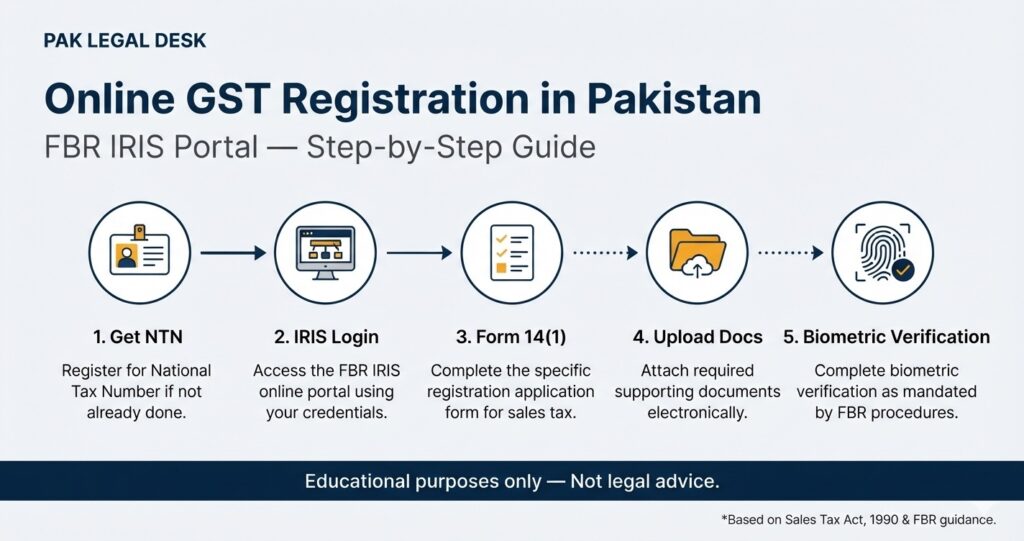

Online GST registration in Pakistan is completed through the Federal Board of Revenue’s (FBR) IRIS portal. A taxpayer must first hold an Income Tax Registration (NTN), then apply using Form 14(1) under the Sales Tax category, upload the required business and bank documents, and complete biometric verification at a NADRA e-Sahulat Centre within 30 days of registration. The FBR does not charge a registration fee. Low-risk applications are currently processed within three working days, while higher-risk cases undergo enhanced scrutiny.
What the Law Says
The registration requirement is set out in Section 14 of the Sales Tax Act, 1990. Every person engaged in making taxable supplies in Pakistan, including zero-rated supplies, in the course or furtherance of a taxable activity must register if they fall within specified categories. These categories include manufacturers (other than those running a cottage industry), retailers liable to pay sales tax, importers, exporters seeking refunds against zero-rated supplies, wholesalers, dealers and distributors, and any person required to register under another federal or provincial law for a duty or tax collected as if it were sales tax.
Registration is regulated by the FBR through the Sales Tax Rules, 2006, which prescribe the electronic filing procedure through the IRIS portal.
Who This Applies To
The registration obligation applies to:
-
Manufacturers who are not running a cottage industry
-
Retailers who are liable to pay sales tax under the Act or rules
-
Importers
-
Exporters who intend to obtain sales tax refunds against zero-rated supplies
-
Wholesalers, dealers and distributors
-
Any person required to register under another federal or provincial law for a duty or tax collected as if it were sales tax
A “cottage industry” is defined as a manufacturer with annual turnover below the prescribed threshold (currently PKR 10 million) and whose annual utility bills (electricity, gas and telephone) do not exceed the prescribed limit.
Importantly, the law does not create a general exemption based solely on turnover for persons making taxable supplies. The raw article’s assertion that a turnover below PKR 5 million exempts a person from GST registration is inaccurate. The turnover thresholds operate to define “cottage industry” and certain retailer categories, but a person making taxable supplies who does not fall within an exempt category remains liable to register.
Practical Procedure: Step by Step
The registration process through the IRIS portal works as follows:
Step 1 — Confirm Income Tax Registration (NTN)
Before applying for Sales Tax Registration, the taxpayer must already hold an Income Tax Registration with at least one business activity marked as Sales Tax or Federal Excise Duty. This is a mandatory pre-condition within the IRIS system.
Step 2 — Log in to the IRIS Portal
The taxpayer uses their IRIS portal credentials to log in at iris.fbr.gov.pk.
Step 3 — Select Form 14(1)
From the Registration drop-down menu, the taxpayer selects Form 14(1) (Form of Registration filed voluntarily through Simplified) under the Sales Tax category.
Step 4 — Furnish Required Information
The taxpayer provides the following information and documents:
-
Tax period
-
Sales Tax information (type of registration — manufacturer or non-manufacturer; for AOP or Company, CNIC of the member/director/principal officer)
-
Bank account details including a bank account certificate issued by the bank in the name of the business
-
Business details including business name, acquisition date, capacity, business activity, and particulars of all branches
-
GPS-tagged photographs of the business premises
-
Registration or consumer number with the gas and electricity supplier, along with pictures of utility meters
-
For manufacturers, GPS-tagged photographs of machinery and the industrial electricity or gas meter
Step 5 — System Registration
On submission of the above information and documents, the system registers the person for Sales Tax.
Step 6 — Biometric Verification
After registration through the IRIS portal, the registered person must visit a NADRA e-Sahulat Centre within 30 days for biometric verification. Failure to visit or failure of verification results in the registered person’s name being removed from the Sales Tax Active Taxpayer List.
Step 7 — Post-Verification (Manufacturers)
For manufacturers, the FBR may require post-verification through field offices or a third party authorised by the Board. If any document provided is found to be non-genuine, fake or wrong, the registered person may be required to provide the missing document within fifteen days, failing which they are removed from the Active Taxpayer List.
Documents Required
The following documents are required for online GST registration:
| Document | Details |
|---|---|
| Income Tax Registration (NTN) | Must already be held; at least one business activity marked as Sales Tax/FED |
| CNIC | Valid Computerised National Identity Card of the individual, or of members/directors/principal officers for AOP/Company |
| Bank Account Certificate | Issued by the bank in the name of the business |
| Business Premises Photographs | GPS-tagged photographs |
| Utility Registration | Gas and electricity consumer number, along with meter photographs |
| Machinery Photographs (Manufacturers) | GPS-tagged photographs of machinery and industrial utility meter |
Processing Time and Fees
Registration Fee: The FBR does not levy a fee for sales tax registration itself.
Processing Time: The FBR has implemented a risk-based processing system. Applications falling within the low-risk category are processed on a priority basis and registration is granted, as far as practicable, within three working days, provided all required documents are complete. Higher-risk or incomplete applications are subject to enhanced scrutiny and may take longer.
The raw article’s statement that processing takes “five to ten working days” does not reflect the current risk-based framework announced by the FBR.
Penalties for Non-Registration
Failure to register when required under the Sales Tax Act, 1990 attracts a penalty of either PKR 10,000 or 5% of the tax amount involved, whichever is greater. Upon conviction by a Special Judge, the person may be sentenced to imprisonment for up to three years, a fine equivalent to the tax amount involved, or both.
Federal GST and Provincial Sales Tax on Services
Pakistan operates a dual system of sales tax. Goods are taxed at the federal level under the Sales Tax Act, 1990, administered by the FBR, at a standard rate of 18%. Services are taxed by provincial revenue authorities (PRA in Punjab, SRB in Sindh, KPRA in Khyber Pakhtunkhwa, and BRA in Balochistan) at rates generally between 15% and 16%. The raw article’s characterisation of “GST” as replacing or conflicting with provincial sales tax is an oversimplification. A business supplying goods may require federal registration; a business supplying services may require provincial registration; and some businesses may require both.
Common Mistakes
Assuming turnover alone determines registration. The law requires registration based on the nature of the activity and the categories specified in Section 14, not merely on turnover. A manufacturer with turnover below the cottage-industry threshold may be exempt from registration, but a wholesaler, dealer or distributor is not subject to the same threshold analysis.
Confusing federal and provincial registration. Federal GST registration (through the FBR) covers goods. Provincial sales tax registration (through provincial authorities) covers services. A business may need one, the other, or both.
Overlooking the biometric verification deadline. Registration is not complete until biometric verification is completed at a NADRA e-Sahulat Centre within 30 days. Failure to do so removes the person from the Active Taxpayer List.
Assuming a digital signature is required for the registration application. The digital signature requirement under the Sales Tax Rules, 2006 relates to the issuance of sales tax invoices under the electronic invoicing and integration regime, not to the initial registration application itself.
Practical Compliance Checklist
-
Obtain NTN and complete Income Tax Registration with a Sales Tax/FED business activity before applying
-
Gather CNIC, bank account certificate, business premises photographs, and utility registration details
-
Log in to IRIS and select Form 14(1) under Sales Tax
-
Upload all required documents and submit the application
-
Visit a NADRA e-Sahulat Centre within 30 days for biometric verification
-
For manufacturers, be prepared for post-verification and ensure all documents are genuine
-
Once registered, file monthly sales tax returns by the 18th of the following month (tax payment due by the 15th)
Frequently Asked Questions
Can a sole proprietor register for GST online?
Yes. A sole proprietor uses their personal CNIC and NTN to complete the application through the IRIS portal. The registration categories and document requirements are the same, though the business details will reflect the proprietorship structure.
Is there a fee for online GST registration in Pakistan?
No. The FBR does not levy a fee for the registration itself. Any costs associated with the process would relate to obtaining documents or professional assistance, not to FBR registration charges.
How long does online GST registration take?
Under the FBR’s current risk-based framework, low-risk applications are processed within three working days, provided documentation is complete. Higher-risk applications undergo enhanced scrutiny.
What happens if I do not complete biometric verification?
If the registered person fails to visit a NADRA e-Sahulat Centre within 30 days of registration, or if verification fails, their name is removed from the Sales Tax Active Taxpayer List.
Is a digital signature certificate required for GST registration?
The digital signature requirement under the Sales Tax Rules, 2006 applies to the issuance of sales tax invoices under the electronic invoicing regime, not to the initial registration application.
Can I amend my registration details after registration?
Yes. Amendments are made through the IRIS portal using Form 181 (Form of Registration filed for modification).
Does provincial sales tax replace federal GST?
No. They operate in parallel. Federal GST (through FBR) applies to goods; provincial sales tax applies to services. A business may be required to register under both systems.
What is the penalty for not registering when required?
The penalty is either PKR 10,000 or 5% of the tax amount involved, whichever is greater. Conviction by a Special Judge may also result in imprisonment of up to three years, a fine equivalent to the tax amount, or both.
Can a cottage industry manufacturer register voluntarily?
The position under the Act is that certain persons not otherwise required to register may apply for registration where they are required to register for imports, exports, or under other provisions of the Act or another federal law.
What if my application is classified as high-risk?
High-risk or incomplete applications are subject to enhanced scrutiny. The FBR has stated that not every application will be automatically approved within three working days.
Final Takeaway
Online GST registration in Pakistan is a structured, document-based process conducted through the FBR’s IRIS portal under Section 14 of the Sales Tax Act, 1990. The key requirements are: an existing NTN, Form 14(1) submission with business and bank documents, and biometric verification within 30 days. There is no FBR registration fee, and low-risk applications are processed within three working days. Businesses should also assess whether they require separate provincial sales tax registration for services.
Pak Legal Desk CTA
If your business operates across federal and provincial tax jurisdictions, or if you are uncertain whether your activities trigger GST registration, Pak Legal Desk can assist with tax registration and compliance guidance. Our team can help you assess your registration obligations and navigate the IRIS portal process. Contact us for a consultation.
References
Federal Board of Revenue. (2026). Sales Tax Act, 1990 (Same as on the official website of FBR dated 30-06-2026). Pakistan Code, Ministry of Law and Justice. https://pakistancode.gov.pk
Federal Board of Revenue. (n.d.). Register for Sales Tax. https://urdu.fbr.gov.pk/categ/register-sales-tax/51148/50848/%20101152
Federal Board of Revenue. (n.d.). Facilitation Measures for Making Paying Taxes and Duties More Convenient. https://download1.fbr.gov.pk
Federal Board of Revenue. (2026). FBR Risk-Based Sales Tax Registration. (Press release, August 2026).
KPMG Tasser Hadi & Co. (2013). Investment in Pakistan. KPMG.
Pakistan Revenue Automation Limited. (2024). FBR notifies new procedure for sales tax registration. Customstoday.
Legal Information Disclaimer
This article is provided for general informational and educational purposes only and does not constitute legal advice. It is based on the laws of Pakistan, including the Sales Tax Act, 1990, and the rules and procedures of the Federal Board of Revenue as verified at the date of publication. Tax laws, rules, rates and administrative procedures are subject to change. The information here should not be relied upon as a substitute for professional legal or tax advice tailored to your specific circumstances. Legal practice in Pakistan is regulated under the Pakistan Bar Council Act, 1973, and relevant provincial bar council rules. Consult a qualified lawyer or tax consultant for guidance specific to your situation.